
Karsten Lehmann 23 September 2026 09:00:00
Yesterday’s post was about peer-to-peer sync - two Haven clients converging directly, with no server in the middle. This one is about the other end of the product: not how the data moves, but who gets to build the thing that uses it.
Haven has been extensible through apps since the App Store shipped. There are two established ways in. You write the app yourself against the MindooDB App SDK, or you hand a coding agent our context files - llms.txt and llms-full.txt, which is the whole SDK reference in one file - point it at the reference app, and let it write the thing. People do both, and both work.
But both of them also hand you a pile of decisions that have nothing to do with the app you wanted. Where does the code live. Who hosts it. Which build command. How does the built thing get an address, and how does that address get registered in Haven, with which databases, at which permissions. None of it is hard. It is just a queue of small, unrewarding steps standing between “we could really use a shift plan” and having one - and that queue is where most internal tools quietly die.
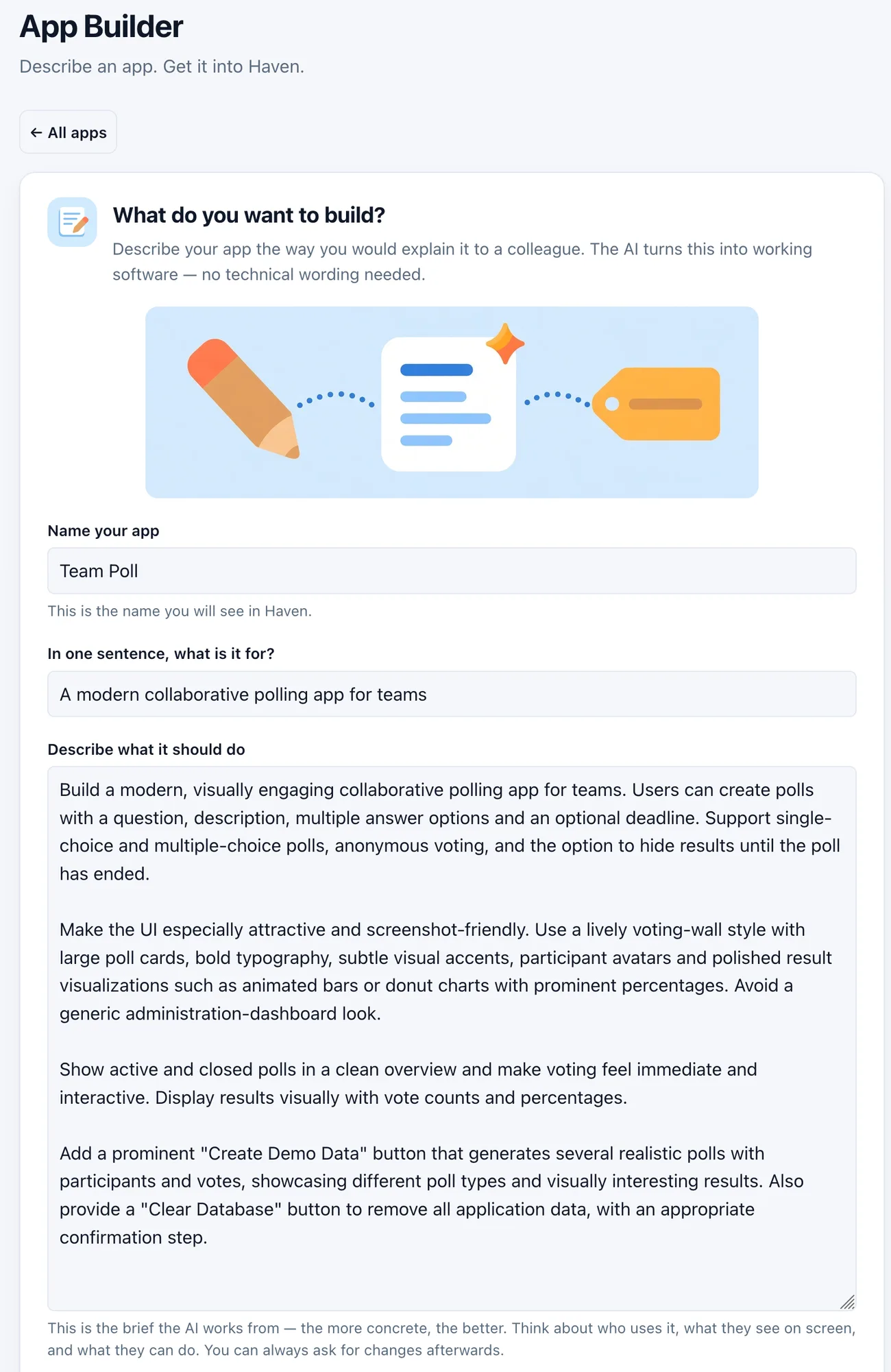
So the App Builder removes the queue. It is an app in Haven’s own App Store, and after a one-time setup it just needs a name, a sentence, and a description of what the app should do.
Why an app an AI wrote is safe to run at all
This is the part that makes the rest defensible, so it goes first.
A Haven app is an isolated web application that runs inside its own sealed frame in the Haven client. The browser keeps it there: it cannot read Haven’s own data, it cannot reach into the page around it, and it cannot navigate Haven away from under you. Everything it does with data goes through the SDK bridge, which is the only channel between the app and Haven.
The bridge is not just a pipe, it is where access is decided. Three things matter here:
-
Apps ask for databases by name, not by location. An app is written against a name like the Team Poll database; which tenant and which physical database that name points at is something Haven holds, and something you can change later. Moving an app from a test tenant to a shared production one is a setting in Haven, not a change to the app.
-
Permissions are granted per database, by the user, at install time. Writing, deleting, reading the change history, attachments, views - each is a separate approval, and an app that was not given one has to cope with that rather than assume it.
-
Useful services come from Haven rather than from the app. The hard parts are the host’s job, and using one of them buys the app no extra access:
- The document scanner. One call opens Haven’s camera capture with perspective correction; you photograph a single page or a whole stack, and the app gets them back straightened as one PDF, attached to the record it asked for. Anything that files paperwork - an expense log, a delivery note, a lab form - gets a scanner without anybody having written one.
- File preview, for Word, Excel, PowerPoint, PDF, Markdown, images, text, audio and video, so an app that stores a file does not have to bring a viewer for it. The video case is my favourite bit of hidden work in there: an mp4 video that was never prepared for streaming would normally have to be downloaded whole before it plays, and Haven repackages it on the fly instead, so it starts immediately and can be scrubbed like any other.
- Drag and drop between apps. Two apps on the same workspace page are two iframes that cannot see each other - and you can still drag something out of one and drop it into the other, because Haven brokers the gesture. The source hands over typed text (plain text, Markdown, JSON, or a reference to a MindooDB document) and a PNG of what is being dragged; Haven carries it across the page, works out what is under the pointer, and delivers it to the target. No markup, no code and no reach into each other’s page goes with it.
Tightening the sandbox
Over the last few weeks we tightened the level above that. With hosted bundles as the deployment target, the finished app is downloaded into Haven and served locally rather than fetched from the web each time - which puts Haven in the middle of every request the app makes, and that is what lets Haven enforce a network allowlist. An app declares the addresses it needs; anything else it tries to call (e.g. via fetch or external script or image references) simply does not happen, and it cannot wander off its own pages either. When something is blocked, you are told:
Haven blocked a network request to
{host}.
That is the property that makes generated code acceptable. An app whose brief was “a shift plan” has no business calling an address nobody declared, and if it tries, the call does not happen and you find out which host it was aiming at.
And it is not an option the App Builder leaves to chance: every app it creates is published as a hosted bundle, which is the strictest of the two deployment modes, with an allowlist that starts out empty. That is why the install dialog further down this article says None. This application cannot reach the network. An AI wrote that app, and it begins with no way to send anything anywhere - if a later version genuinely needs to call an address, that address has to be declared, and you have to approve it.
Connect three accounts, once
The only technical part is the first five minutes, and it happens once for every app you will ever build: a setup page where you connect three services and approve a couple of installs. Three accounts, and only one of them costs anything:
- GitHub holds your app’s code, so nothing is locked in.
- Cloudflare publishes it at its own web address and rebuilds it on every push.
- Cursor is the AI that writes the code. Its free Hobby plan does not include the cloud agents the builder starts - that needs a paid plan, from $20 a month.
GitHub and Cloudflare are free, and both connect through their own consent screens, so there is no account id or owner name to look up anywhere. Cursor has no consent flow, so you paste an API key from its dashboard.
Where those credentials end up is worth being precise about, because this is a browser app asking for tokens that can create repositories and deploy code. They live in one document in your own App Builder database, sealed for you personally (all your devices) - shared database or not, nobody else can read it. The GitHub token never leaves the browser tab, because GitHub lets the page talk to it directly. The Cloudflare token and the Cursor key do reach the builder’s server, for the calls a browser is not allowed to make (no CORS support), and each request carries the one it needs and nothing is kept afterwards. And no credential is ever handed to the coding agent: giving a cloud machine a token that can deploy would have been the convenient design, and publishing instead runs through Cloudflare’s own Git integration, which needs no hand-off at all.
If you would rather the Cursor key did not pass through a server you do not run, the builder is open source and a local copy is three commands, served at http://127.0.0.1:4400 and added to Haven through App Store → New app → From URL. Same application, key never leaves your machine.
A name, a sentence, and a brief
The brief in that screenshot is the whole input, and it is worth reading as an example of what the form actually wants: what the app is for, who uses it, what appears on screen, what a person can do - plus, in this case, a request for a demo-data button, because an app you are going to show somebody needs something in it. No technical wording anywhere.
Everything else on the form has a default that works. The web address is derived from the name, the repository is private, and the app gets one database of its own with a sensible set of permissions. Two collapsed sections - Web address and privacy, Database and access - let you change any of that, and most of the time there is no reason to.
Then one button: Build my app.
Ten steps, and what each one actually does
The wait is about two minutes, and the builder narrates it rather than showing a spinner, because a silent two minutes feels like a hang.
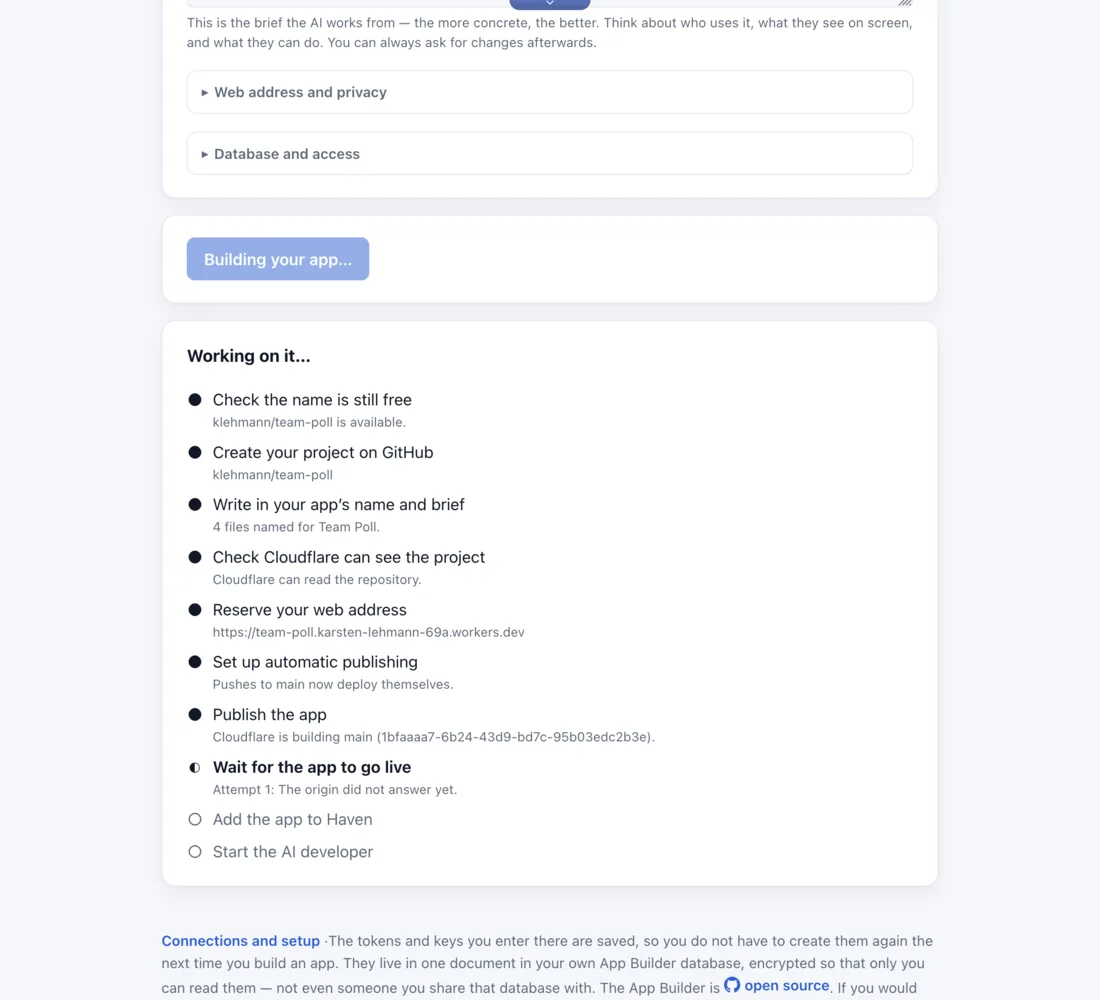
Since the labels are deliberately non-technical, here is what is happening behind each of them:
| Step | What happens |
|---|---|
| Check the name is still free | The name has to serve as the project, the web address and the app’s identity all at once, so it is checked before anything is created |
| Create your project on GitHub | A new private project, created from our starter template: a small working app, the SDK wiring, the hosting configuration, and a rules file the AI is required to read first |
| Write in your app’s name and brief | Your name and your brief are written into the project itself, so the AI’s instructions live with the code rather than in a chat window |
| Check Cloudflare can see the project | GitHub does not report what Cloudflare is allowed to see, so the builder asks Cloudflare whether the new project is visible to it |
| Reserve your web address | The address is registered and switched on before there is anything to serve at it |
| Set up automatic publishing | Cloudflare is wired to the project, so from here on every change that lands is rebuilt and published with nobody deploying anything |
| Publish the app | The first build, started explicitly, because the app’s code arrived a moment before the thing that watches for new code existed |
| Wait for the app to go live | The builder asks the new address every few seconds, for up to five minutes, until the app answers with its own description |
| Add the app to Haven | The finished address is offered to Haven - the one extra permission the builder itself holds, and an offer rather than an install |
| Start the AI developer | A Cursor cloud agent is set to work on the project, on the branch that publishes itself |
Haven asks before it installs
The handover is not a privileged back door, but an SDK feature. The builder passes Haven a URL, and Haven fetches the app’s description from that address itself and puts the result in front of you before it downloads anything:
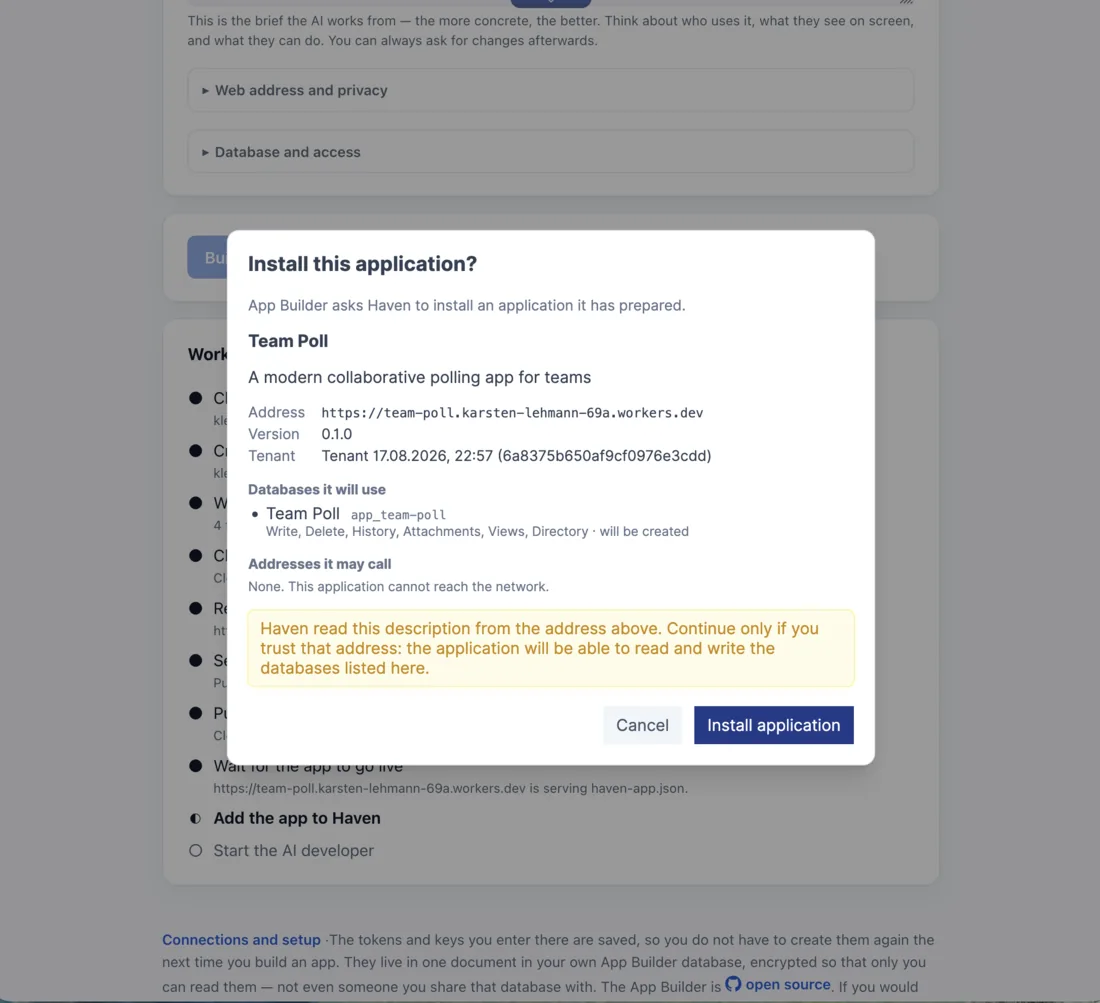
Databases, permissions, and network access - the last of which reads None. This application cannot reach the network here, because a polling app has no reason to call anything. Note also what the same mechanism means later: a new version cannot widen any of this. It can change the app’s description, its version and its files, and it cannot add a database, widen a permission or add an address it may call - because whoever controls the web address controls that description, and a hosting account that got taken over must not be able to quietly grant itself databases and permissions you never agreed to. Haven names the extra request and keeps what you approved; granting it is a deliberate act in the app’s settings, or a remove and reinstall - and removing an app does not delete its data.
Watching the AI work
By now the app is published and installed, and the interesting part is only starting. The brief went to a cloud agent, and you can open its session and watch.
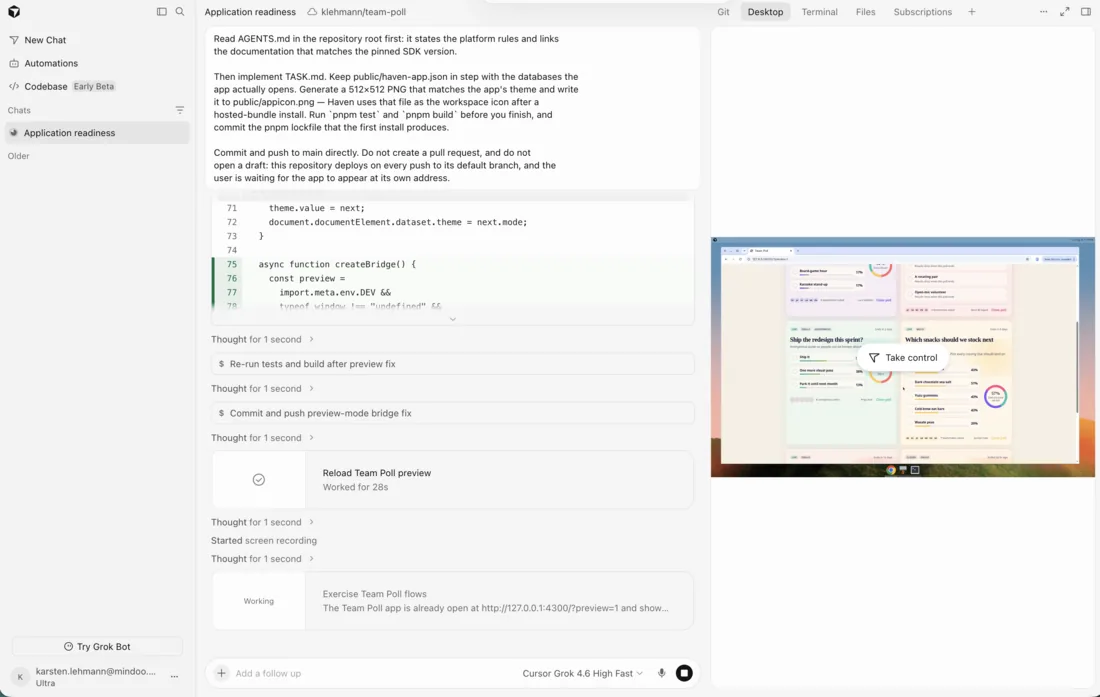
Those instructions are not a demo prompt, they are the contract. The rules file ships in the starter template, so the agent learns the rules of the platform before it reads your brief. It draws an icon for the app, which is why a new app arrives in Haven looking like a real one rather than a placeholder. It has to leave the project’s tests and its build passing. And it commits to the branch the hosting watches, so everything it finishes republishes the live app on its own.
The right-hand pane is the part that is fun to watch: the agent opens the app in its own browser and clicks through it - and at the end it records what it built:
A minute of the finished app, recorded by the thing that wrote it.
What comes out
An ordinary web app at its own address - which is where Haven picked it up from, and where anybody else’s Haven can pick it up too.
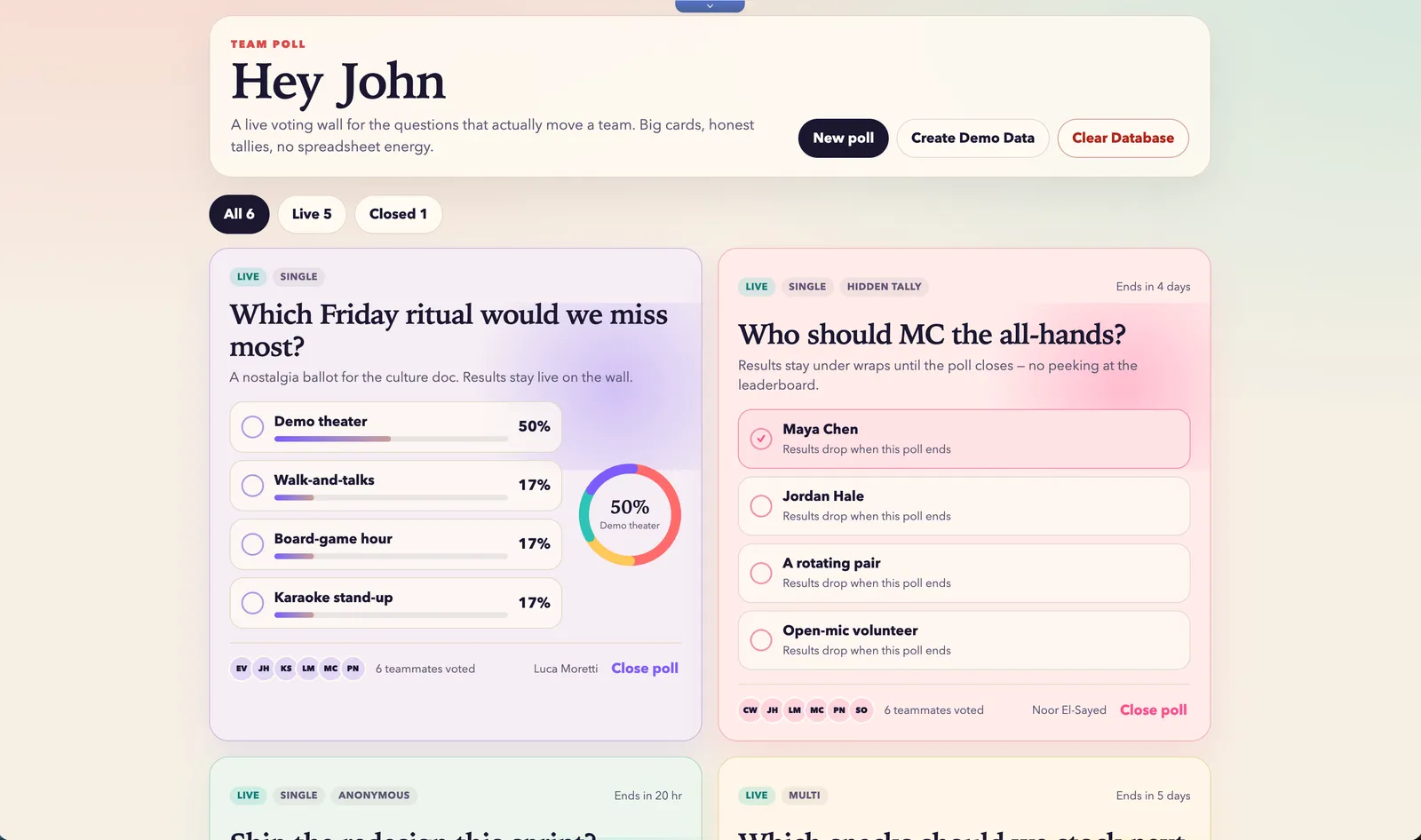
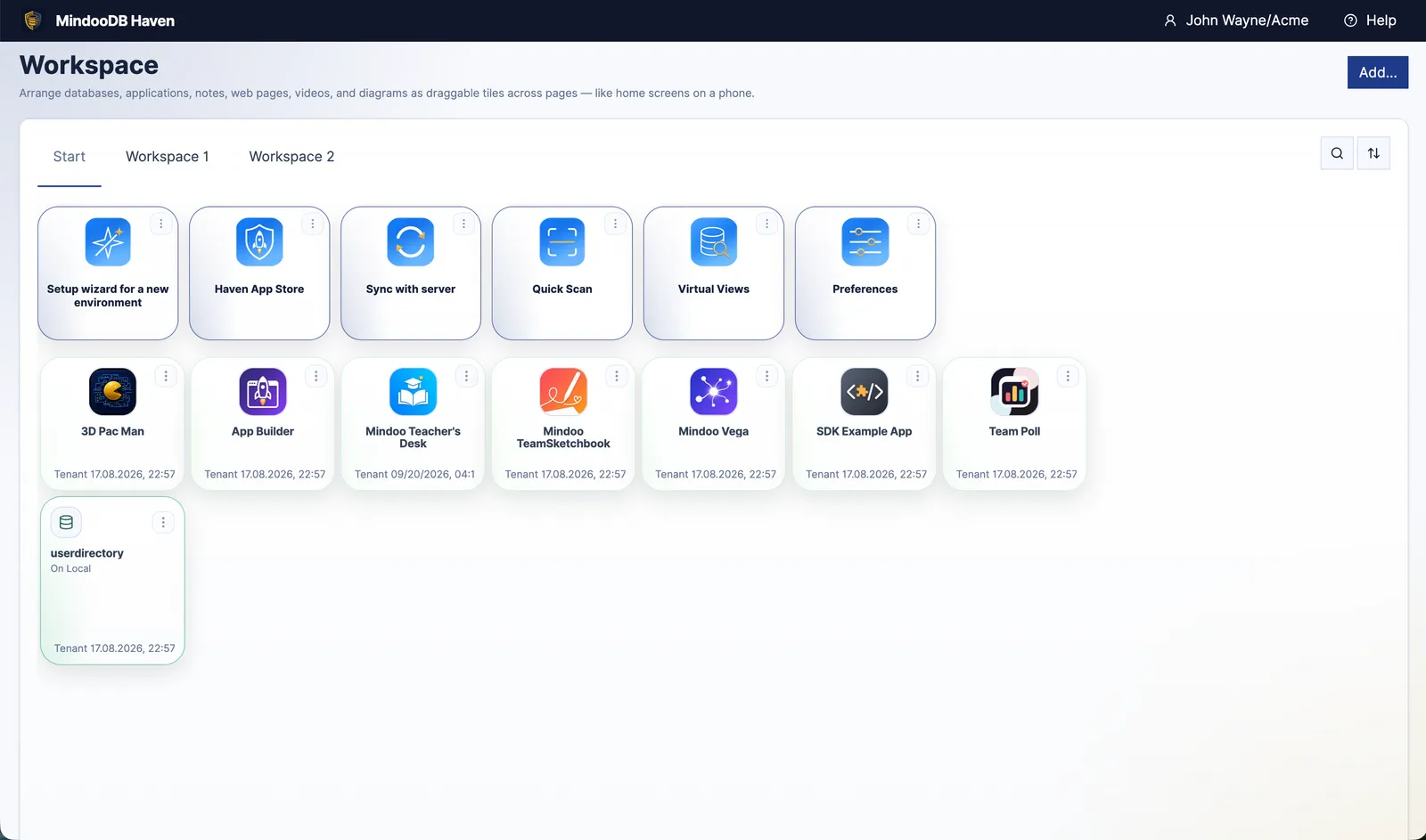
And in Haven it lands on the workspace’s Start tab, an icon among everything else that lives there - wearing the icon the agent drew for it:
From there it opens full screen, or sits as a tile on a workspace page beside other apps:
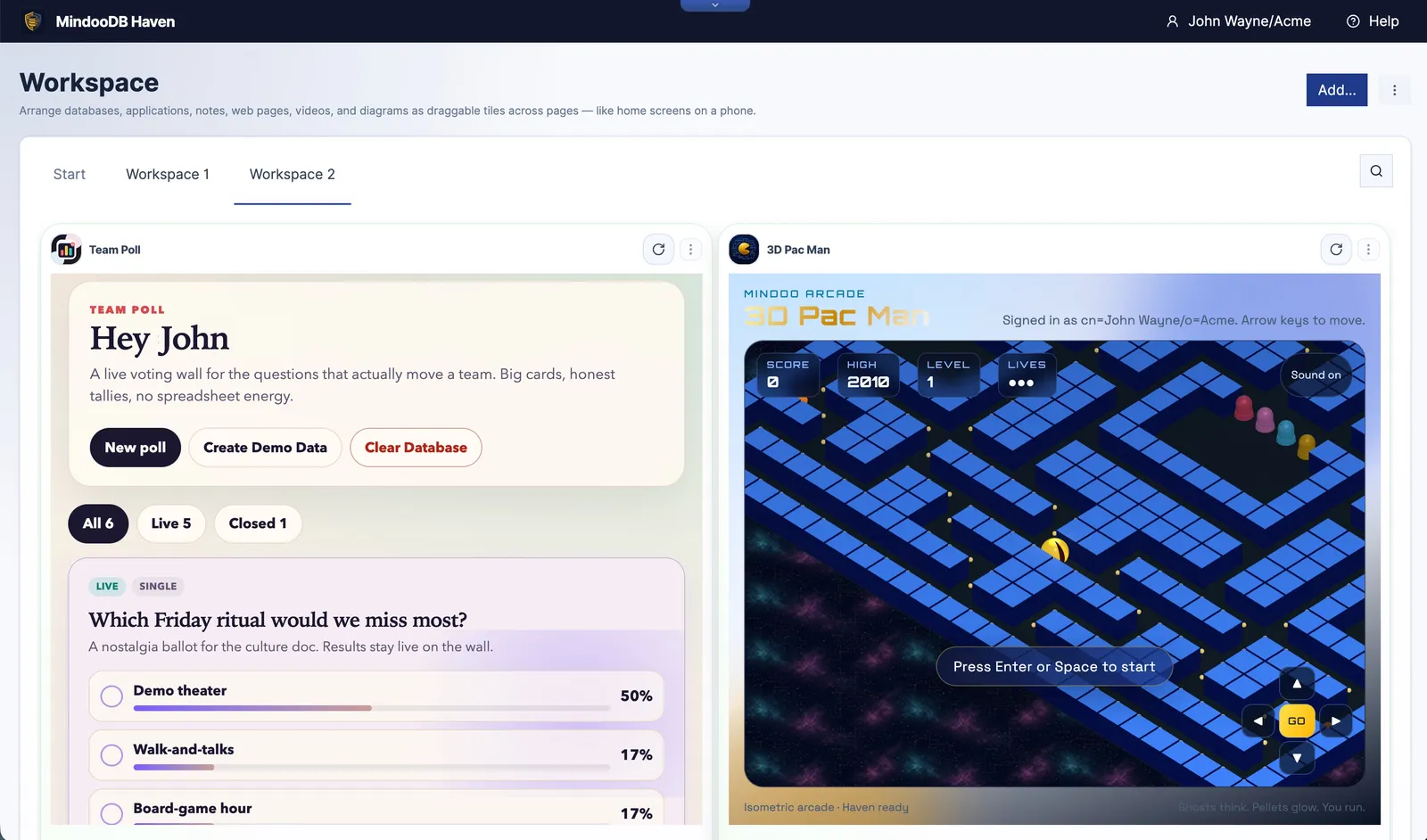
Phone, tablet or desktop too - the app is a Haven app, so it inherits all of that. What runs there is the copy Haven downloaded, which is also why it keeps working when the network does not. The second tile there is a 3D Pac Man, and we had that one built the same way - a name, a description, one button. It is not a serious business application, which is exactly why it is a good illustration: nobody wrote a line of it, and it is now sitting in a workspace next to a polling app that was made the same afternoon.
Coming back to it later
The builder opens on the list of what you have built, and every app keeps a page of its own - its address, its repository, its hosting, its agent.
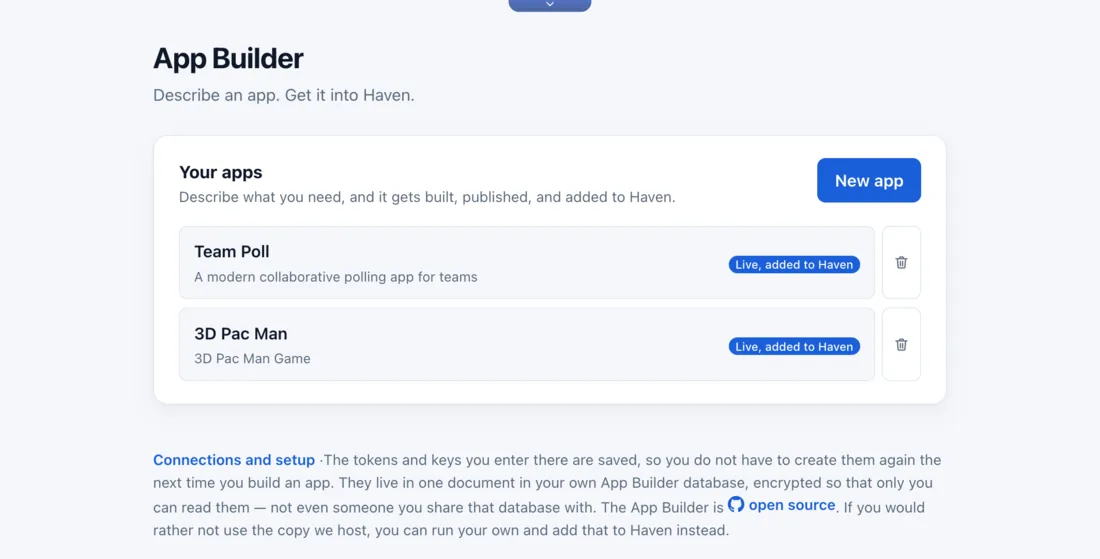
Which matters because the first version is rarely the last one. Asking for the next feature is another brief in the same session - or a sketch, or a screenshot of what it should look like - and the agent changes the code, pushes, and Cloudflare republishes. No programming knowledge is needed for that loop either. It is the same conversation as the first one.
And Cursor is replaceable. What the builder created is an ordinary Git repository in your own GitHub account with a documented starter app in it. Point Claude Code or Codex at it, or open it in an editor and write the change yourself. Cloudflare republishes whatever arrives, whoever wrote it.
Handing an app to somebody else
The app’s address is public, and that turns out to be the whole distribution mechanism. Send the URL to a colleague or to another organisation’s Haven, and they use App Store → New app → From URL: Haven reads the app’s description from that address, shows them the databases, permissions and network access it asks for, they confirm, and it is installed in their tenant against their data.
Public address, private data. An app carries no data of its own - a stranger who opens the URL gets the empty application and nothing behind it, because everything it ever reads or writes arrives through Haven, under permissions a person granted it. Which is why sharing an internal tool between two organisations is a link rather than an export.
Limits, stated plainly
The cloud agent needs a paid Cursor plan, from $20 a month. GitHub and Cloudflare are free. The agent is also the last step rather than a prerequisite, so you can leave that account for later and still have a published app.
Cloudflare and Cursor have to be able to see the new repository, and that is the one setup choice worth a thought. Allowing them all repositories is what keeps app-building down to a single button, because a repository the builder has not created yet cannot be picked from a list. Approving each new project by hand works too - the builder stops and tells you when that is due. If all repositories feels too broad, keep a GitHub account just for these apps.
A brief is an input, not a wish. The agent writes what the description says, so a vague description gets a vague app. The brief at the top of this article asks for specific interactions, a specific visual treatment and a demo-data button, and that is why it produced something demonstrable. This is also why the loop matters more than the first run: the second brief is always better than the first.
The hosted builder’s server sees your Cursor key on the calls a browser cannot make. It is not stored, and it is not the kind of secret you have to hand over for good either: Cursor lets you give a key an expiry date when you create it, and delete it from its dashboard whenever you like. If a server you do not run is still one server too many, run your own copy.
An update cannot widen a grant. If a later version of your app needs a second database, the user has to grant it - in the app’s settings, or by reinstalling. Worth knowing before you ask the agent for a feature that needs one.
What this adds up to
The App Builder completes the platform. Everything else was already in place - the collaboration, the history, the encryption, the app model with its permissions and its allowlist - and every bit of it assumed that somebody would write the apps. A description is now enough, and what comes out is a real app with its own repository and its own address, not a prototype.
The App Builder is in Haven’s App Store now, and it is open source, as is MindooDB under the Apache 2.0 licence. Haven Community is free for private and commercial projects at haven.mindoodb.com, there is more on how apps work at mindoodb.com/haven/apps, and everything else is at mindoodb.com.