
Karsten Lehmann 7 March 2009 12:07:33
Here is a tool that I often use to modify fields an a selected document. No Java solution (yet), simple @-formula code that you can just paste into a newly created toolbar icon of your Lotus Notes client. I’ve only tested with R8 so far, but I think it should also work in R7.
After the “installation” of the icon, select a document and click on the icon:
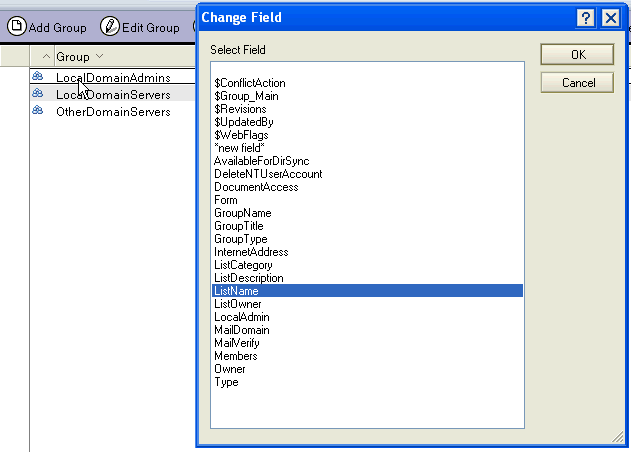
Here you can choose which field you would like to change or - as an alternative - you can create a new one.
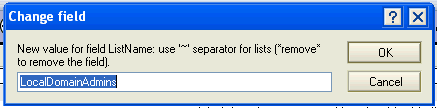
Enter the value of the field. Use ”~” to separate values of lists.
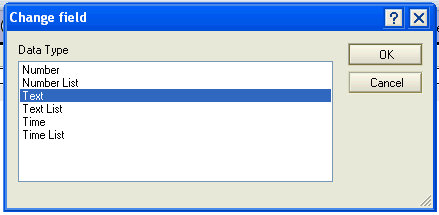
The last step is to define the data type of the field. In most cases, the right value should be preselected.
Please Note:
This is an expert tool. You may damage your Notes application logic if you change the wrong field values.
Alternative for Notes R8:
An alternative for read only access on the document fields is the Domiclipse DocViewer plugin.
You can find it here.
So, finally here is the code for the toolbar icon:
unid:= @Text(@DocumentUniqueID);

theField := @Prompt([OkCancelList]; "Change Field"; "Select Field"; ""; "":"*new field*":@DocFields);
isNewField := @If(theField="*new field*";"1";"0");
theField := @If(theField="*new field*";
  @Prompt([OkCancelEdit]; "New field name"; "Name of the new field"; "fieldname");theField);

currValueTemp:= @If( @IsAvailable(theField); @GetDocField(unid; theField); isNewField="1" & theField!="";""; "errorTemp" );
currValue:= @If( @IsError(currValueTemp); "errorValue"; @Implode(@Text(currValueTemp);"~") );
theValue := @Prompt([OkCancelEdit]; "Change field"; "New value: use '~' separator for lists (*remove* to remove the field)."; currValue);

currTypeSingle:= @If( @IsNumber(currValueTemp); "Number"; @IsTime(currValueTemp); "Time"; "Text" );
currType:= currTypeSingle + @If(@Elements(currValueTemp)>1;" List";"");

theType := @If(theValue="*remove*";"Text";
  @Prompt([OkCancelList]; "Change field"; "Data Type"; currType; "Text" : "Time" : "Number" : "Text List" : "Number List" : "Time List"));

@If(
  theValue = "*remove*";
  @SetField(theField; @DeleteField);

  theType = "Time";
  @SetField(theField; @TextToTime(theValue));

  theType = "Number";
  @SetField(thefield; @TextToNumber(theValue));

  theType = "Text List";
  @SetField(theField; @Trim(@Explode(theValue;"~")));

  theType = "Number List";
  @SetField(theField; @TextToNumber(@Explode(@Trim(@ReplaceSubstring(theValue;" ";""));"~")));

  theType = "Time List";
  @SetField(theField; @TextToTime(@Explode(theValue;"~")));

  @SetField(theField; @Text(theValue))
)